
Trade and wholesale, with Fixory Pro
Fixory Pro adds what you need to sell to other businesses: trade accounts with credit limits, your own trade prices, quotes and orders invoiced to the account, statements and payment reminders, and reports on what each trade customer is worth. It integrates with Xero and Stripe.
Trade accounts and prices
Keep an account for each business customer, with their contacts, addresses, credit limit and payment terms.
- Set trade prices from price lists by product or category, give a customer their own prices, or override a price once.
- Choose which products each trade customer can order, by category or by hand.

Quotes, orders and invoices
Turn a trade quote into an order, deliver it in full or in part, and invoice it to the account.
- Use pro forma terms when goods should go only once the customer has paid.
- Raise a credit note for all or part of a trade invoice.
- Take returns from trade customers back to stock or to a faulty hold, and send returns to your suppliers.

Getting paid
Record what a trade customer pays and set it against their invoices. Anything extra is held as credit.
- Email a customer their account statement as a PDF, and send payment reminders before and after invoices fall due.
- See what each trade customer owes and how late it is in the aged debt report.
- Write off a bad debt six months after it fell due, and reverse it if the money comes in.

Xero and Stripe
Fixory Pro integrates with Xero and Stripe. Connect your own Xero organisation and your own Stripe account from Fixory's Settings, and disconnect them at any time.
- Match your Xero accounts and VAT rates once, and link each trade customer to a Xero contact. Fixory then sends your trade invoices, credit notes, payments, refunds, bad-debt write-offs and the related bank transactions to Xero automatically.
- Fixory only adds new entries to Xero and never changes what's already there. A correction goes as a credit note or reversal, and your books stay yours and your accountant's.
- Trade customers pay an invoice or statement by card on Stripe's own secure page, from a link you email or in the trade portal. The money goes straight into your Stripe account, and the invoice is marked as paid, with a receipt.
- Fixory never sees card details, never holds the money and takes no fee. Refunds and disputes are handled in your Stripe Dashboard, and Fixory flags them so you can record them.
Reverse charge on mobile phones
When a trade invoice to a VAT-registered business includes £5,000 or more of mobile phones before VAT, Fixory applies the UK domestic reverse charge to those phones, as HMRC's VAT Notice 735 describes. The invoice shows no VAT on them and states the VAT your customer must account for.
- Credit notes follow the same rule, the accountant export marks these lines "Reverse charge", and they go to Xero with their own tax rate.
- If the customer has no VAT number on file, the order can't go out until one is added.
Know your trade customers
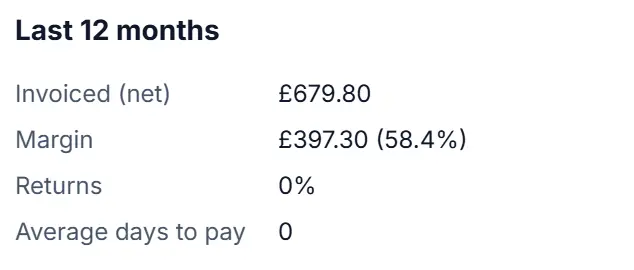
See the margin, returns and days to pay for each trade customer.
- Get reorder suggestions from what you sell, your suppliers' lead times and pack sizes, with every figure explained.
- Group products by value and steadiness, see seasonality from a year of sales, and export the analysis to CSV.
Good to know
- Trade and wholesale features come with the Fixory Pro plan, which includes everything in Fixory Shop. See pricing
- Xero and Stripe are for trade invoicing. Till takings from walk-in customers aren't sent to Xero, and Stripe isn't a card machine for the counter.
- You need your own Xero subscription and your own Stripe account. Stripe's fees are between you and Stripe.
- The reverse charge covers mobile phones only. It isn't tax advice, so check your own position with your accountant.
- It doesn't connect to other accounting, payment or e-commerce services.
Common questions
Can I sell to trade customers?
Yes, with Fixory Pro. It adds trade accounts with credit limits and payment terms, your own trade prices, quotes and orders invoiced to the account, and statements and payment reminders.
Can trade customers pay their invoices online?
Yes, with Fixory Pro and Fixory Business. Connect your own Stripe account, and a trade customer can pay an invoice or statement by card on Stripe's own secure page, from a link you email or in the trade portal. The money goes straight into your Stripe account, Fixory marks the invoice as paid, and it takes no fee. It's for trade invoices, not for sales at the till.